
Dear all,
Today is released ne firmware for 4 devices. Changes and download links are below. The compatibility sheets are attached.
InBody 270 : Download here
InBody 370s : Download here
InBody 570 : Download here
InBody 770 : Download here
Changes from 0430 :
[UI and function modifications]
2. (Request 23-0140) Addition of member subscription and kiosk related functions
- Functions available when connected to the Internet, enabled in the cloud, or logged in to the cloud in the settings.
- If you press '0' on the keypad 5 times on the logged in cloud settings screen, the European subscription function (Count1 or CNT1) will be set. If you then press '0' on the keypad 5 more times, the US subscription function (Count2 or CNT1) will be set. Set to CNT2).
- After measuring weight, the ID input screen changes to the Pin Code input screen, and after entering the Pin Code, the remaining number of measurements is received from the server.
- If there are members with remaining counts, measurement is performed; if not, an error screen is displayed.
- Self-mode will be changed so that it cannot be used, and only expert mode can be used.
3. (Request 23-0191) Modify the WiFi SSID input keyboard to allow input of special characters in the same way as the password input keyboard.
5. (Request 23-0193) Response to InBody UI change for web users
- Modified to turn on/off the same button with ID as a hidden function.
- Configuration through test mode 04. After entering the Cloud Service, press ‘1’ on the keypad to set with a ringing sound. Afterwards, if you press ‘1’ on the keypad again, it will be released with a ding sound.
6. (Request 23-0321) Match LB120 and equipment CSV contents
- If blood pressure was not measured, the part that shows 0 was modified to show –.
8. (Request 23-0358) Added a function to delete automatically recorded logs and removed the auto-save function.
- Automatically saved logs are deleted when resetting the event code in test mode. (You can check the remaining memory on the first page of settings)
- Changed to no longer record logs that were automatically saved unnecessarily when upgrading the program.
9. (Request 23-0358) Improvement work on the Wi-Fi linkage program
- Improved the issue of the product freezing due to insufficient memory on the home screen after connecting the COMPAST 5G Wi-Fi dongle.
- Improved connection to hidden network not connecting issue.
- Fixed an issue where the message “password is incorrect” was displayed even though the password was entered correctly after selecting the SSID.
- The time it took to connect after searching for Wi-Fi was improved by about 15 seconds from about 50 seconds to about 35 seconds.
- Improved the part where the Wi-Fi sensitivity on the home screen was different from that of other products after connecting to Wi-Fi.
- When the same Wi-Fi SSID is searched (ex> Mesh Wi-Fi), only the one with the best signal sensitivity is displayed.
10. (Request 23-0358) Modified so that Yes No can be selected with the keypad in the re-login window after rebooting.
- Keypad ‘Enter’ is yes, keypad ‘<-’ is no.
11. (Request 23-0358) Add DB recovery function
- Settings 08. After entering data backup/restore/merge, touch the bottom right corner of the LCD 5 times to proceed with the process of restoring the broken DB, and a ringing sound will be output upon completion.
12. (Request 23-0358) Settings 05. Modified to omit age/gender so that if personal information is received from the cloud even if age is omitted, it is applied as received.
13. (Request 23-0358) Modified to not record WebStatus Error when checking the status on the home screen in the web log.
- Improved the issue where many logs are accumulated unnecessarily when the Internet connection is lost.
14. (Request 22-0513) Added function to receive weight value when linking with BSM370
- As a hidden function, when you touch number 5 in the upper left corner of the height meter linkage pop-up window, “Height meter is connected.” The text is changed to “Height meter/Weight scale are connected.” and the height meter image is changed to a height meter & weight scale image.
- Afterwards, when measuring a height meter, the height/weight values are received from the height meter and displayed on the screen, and the corresponding values are applied and measured
[Test mode modification]
1. (Request 22-0623) QC Report Modification
- When setting the Korean/American/Chinese language, the QC Report has been modified to display (KR) for the Korean language, (USA) for the United States, and (CH) for the Chinese language.
2. (Request 22-0576) Modify Setup2 initialization function in test mode Initialize.
- When the Setup2 initialization function is activated, only the country/language is left set when the Setup is initialized, and in addition, the date/date format/time/unit/printer/standard range are also set to the values set just before. Modified to remain.
3. (Request 22-0641) Improvement of InBody product line program
- Modified to change the country/language by entering preferences in test mode so that it is set to the default settings for that country/language.
- Added a function to show the presence of Bluetooth – Check with (BT: O) or (BT: X) in the test mode QC Report.
5. (Request 23-0307) Request from Production Department
- Addition of Loadcell Test function
- After Loadcell Calibration No. 4 in test mode, enter Loadcell Test No. 5, climb on the footrest twice, and compare the two data when stabilizing the weight. If it is within the error range, it is PASS.
- 1. If PASS appears to the right of the Save button, press button 1 on the LCD to save and exit, and it will be saved as PASS in QC.
- Added PBF Test function
- If one test is performed with an auto jig during production, two in-body inspections are performed at the end. At this time, the measured PBF values are compared and if it is within the error range of the value set for each product, it is recorded as PASS, and if it is outside the error range, it is recorded as Fail. If calibration is performed with a general calibration jig rather than an auto jig, the PBF Test result is recorded as -.
[Open Protocol Modification]
1. (Request 22-0642) Open Protocol lock/unlock function on/off
- Previously, the status value of the open protocol lock command was ‘0’ for one-time lock release and ‘1’ for product lock setting, but in the case of ‘2’, it was modified to set product lock release.
2. (Request 23-0023) Open Protocol basal metabolic rate standard range re-registration
- 970/BWA: Modified so that the basal metabolic rate standard range is transmitted via open protocol in all languages except Japanese.
- 770/570/470/370S/270: Modified so that the basal metabolic rate standard range is transmitted via open protocol in all languages except for the US and Japanese.
3. (Request 23-0137) Addition of evaluation items for open protocol/API
- Modified to transmit nutritional evaluation, obesity evaluation, body balance evaluation, muscle evaluation by region, and fat evaluation by region to the open protocol.
- Nutritional evaluation, obesity evaluation, and body balance evaluation are 970/BWA (all languages), 770 (Korean/multilingual/Japanese), 570 (Korean/multilingual/Japanese), 470 (Korean/Japanese), 370S (Korean/multilingual/Japanese) Japanese), 270 (Korean/multilingual/Japanese).
- Only 470 (Korean/Japanese), 370S (Korean/multilingual), and 270 (Korean/multilingual/Japanese) are available for muscle evaluation by region and fat evaluation by region
Changes from 0440 :
Some of the contents of the existing personal information text are revised.
- Korean: Revised the part where only personal information consent was received, consent to collect anduse personal information, consent to the use of InBody terms and conditions, consent to the processing ofsensitive information, consent to provide personal information to a third party, and consent of legalrepresentative when measurers are under the age of 14 are included on one screen.
- U.S.: The part that received consent for personal information and conditions of use is maintained, but theUI has been changed to proceed with all of the parts that were carried out in a step with consent on onescreen. For those under 13 in Canada, under 18 in United States, “Consent of legal guardian for minors ”added for consent.
- Etc.: Only the UI has been newly changed in the part where only the existing personal information consenthas been revised, and the function of obtaining consent from the legal representative is added if the age is under the applicable age for each country.
Date of application for new devices :
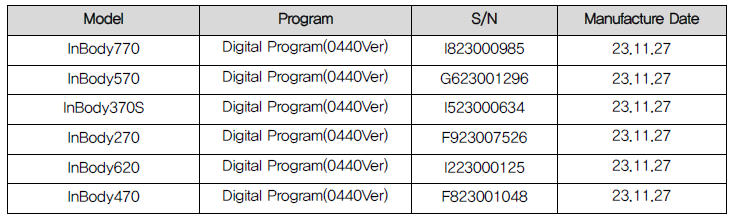
InBody270-2_설계변경계획서_정훈_231012.xlsxInBody370S_설계변경계획서_정훈_231012.xlsxInBody770_이력대장_호환리스트_정훈_231012.xlsxInBody570_이력대장_호환리스트_정훈_231012.xlsx